Android Utility PRO v132.00.2842 Patched Update – Works Offline, No Dongle Card Required
FREE
110 downloads
Windows

Published byPir Muhammad akash
Verified Publisher
Security Status: SAFE
Scanned by 65+ antivirus engines • No threats detected
Screenshots & Preview

Click on images to view full size (1 images)
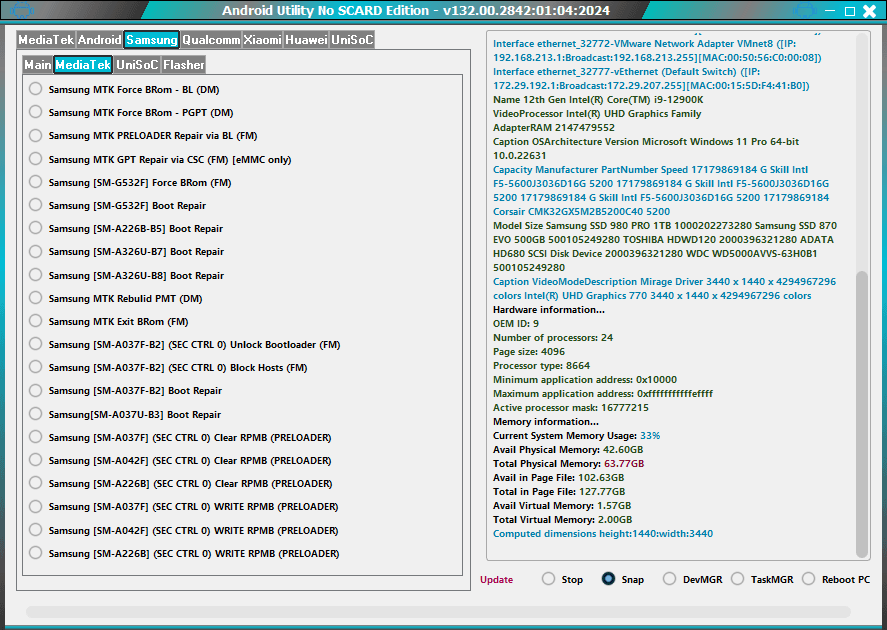
Discover the latest Android Utility PRO v132.00.2842 Patched Update with functionalities such as Works Offline and No Dongle Card Required. Explore MTK Brom Mode Features like Authentication & Security, Disable Auth, Dump Preloader, and more.
Comprehensive Brand Support
Premium Brands
- Samsung: Complete suite of tools for all models
- Xiaomi: Advanced MIUI support
- OPPO: ColorOS compatibility
- OnePlus: OxygenOS integration
- Huawei: EMUI support
Additional Supported Brands
- Nokia
- Vivo
- Motorola
- Realme
- Micromax
- Lava
- HTC
- ASUS
- Honor
- Lenovo
- Alcatel
- MEIZU
- Tecno
- ZTE
- Karbonn
- TCL
MTK Brom Mode Features
Authentication & Security
- Disable Auth
- Dump Preloader
- Crash Preloader
- Crash Preloader To Brom
Samsung-Specific Operations
- Samsung MTK Force Brom (DM)
- Samsung MTK Exit Brom
- Samsung MTK Rebuild PMT (DM)
Device Control
- FRL-L22 Y9A Force Brom
- Reboot Meta
- Reboot AT Mode
- Reboot Factory Mode
- Reboot Fastboot Mode
Analysis Tools
- VIVO New SEC Read info (FM)
- Analyze MTKA DA
- Analyze Preloader
META Mode Capabilities
Data Operations
- Read Meta Info
- Read/Write Part Operations
- Format Part (Meta)
- Dump Operations:
- MDDB/APDB
- NV Regions
- User area
- PGPT
- EXT_CSD
System Management
- EMMC Health Check
- Factory Reset (Multiple Methods)
- Gen FRP Reset PKG
- NVRAM Operations
- Network Unlock
Android Mode Functions
Device Information
- Read ADB Info
- Read Fastboot Info
- Exit Fastboot Mode
System Modifications
- Xiaomi Enable Diag (ADB)
- Install APK (ADB)
- Disable Payjoy APP
- Generic FRP Operations
ROM Management
- Extract Super IMG
- Extract Various ROM Types:
- OFP (MTK + QCOM)
- Samsung ROM (MTK)
- Huawei UPDATE
- OnePlus ROM (.ops)
- LG ROM (.kdz)
- RedMagic (payload.bin)
Special Features
Samsung Tools
- Reboot to Download Mode
- Read Info Download Mode
- Factory Reset (MTP)
- Activate ADB (MTP)
Huawei Utilities
- Fastboot To Upgrade
- Normal To Upgrade
VIVO Solutions
- Demo Remove (AT)
- Demo Remove (MT6877T)
Format Conversion
- PGPT to Scatter
- Scatter to PGPT
Advanced Samsung Features
Device Management
- Samsung MTK Force BRom (DM)
- Samsung MTK Exit BRom (FM)
- SM-A326U (A32 5G) BIT7 Fix Dead Brick
- SM-A037F KG Locked Force Brom (DM)
System Control
- Samsung Read Info (DM)
- Samsung Reboot Options
- Samsung Activate ADB (MTP)
- Samsung Factory Reset (MTP)
- SEC CTRL FLAG Management
Technical Requirements
- Windows 10/11 64-bit OS
- USB 3.0 ports
- Latest USB drivers
- .NET Framework 4.5+
Easy Installation
Simple setup process with clear instructions
Safe & Secure
Scanned and verified free from malware
Fast Download
Multiple mirror servers for fastest download speeds
Minimum Requirements
Operating SystemWindows 7 / Android 5.0
Processor1 GHz
RAM512 MB
Storage100 MB free space
Recommended
Operating SystemWindows 10/11 / Android 10+
Processor2 GHz Dual Core
RAM2 GB
Storage500 MB free space
v1.0October 28, 2024Latest
- Latest version with all current features
- Bug fixes and performance improvements
- Security updates and patches
- Compatibility improvements
5.0
2 reviews
Rate & Review This Software
User Reviews
No reviews yet. Be the first to review!
About the Author / Developer
📱 Related Apps You May Like
![SK Unlocker V23: Professional Mobile Unlocking Tool [2024 Latest Version Free]](https://modsapps99.com/wp-content/uploads/2024/10/MAINICON-150x150.webp)


![Cellebrite UFED4PC v7.70.180 Advanced Mobile Forensics Tool [Free Download]](https://modsapps99.com/wp-content/uploads/2024/10/Cellebrite-UFED4PC-v7.70.180-Advanced-Mobile-Forensics-Tool-Free-Download-150x150.webp)


Download Mirror Options
Choose your preferred download server:
All mirrors are virus scanned & verified
How to Install
- Click the Download button above
- Wait for download to complete
- Run the installer file (.exe)
- Follow the installation wizard
- Launch the application
How to Extract (ZIP/RAR)
- Download and install WinRAR or 7-Zip
- Multi-part archives: Download all parts (.part1.rar, .part2.rar) into the same folder
- Right-click on any one part (usually .part1.rar)
- Select "Extract Here" or "Extract to folder"
- Tool will auto-extract all parts