Dolphin Tool v1.0 Management ADB, Fastboot, MTK: Advanced Phone (Free Download)

Security Status: SAFE
Scanned by 65+ antivirus engines • No threats detected
Screenshots & Preview
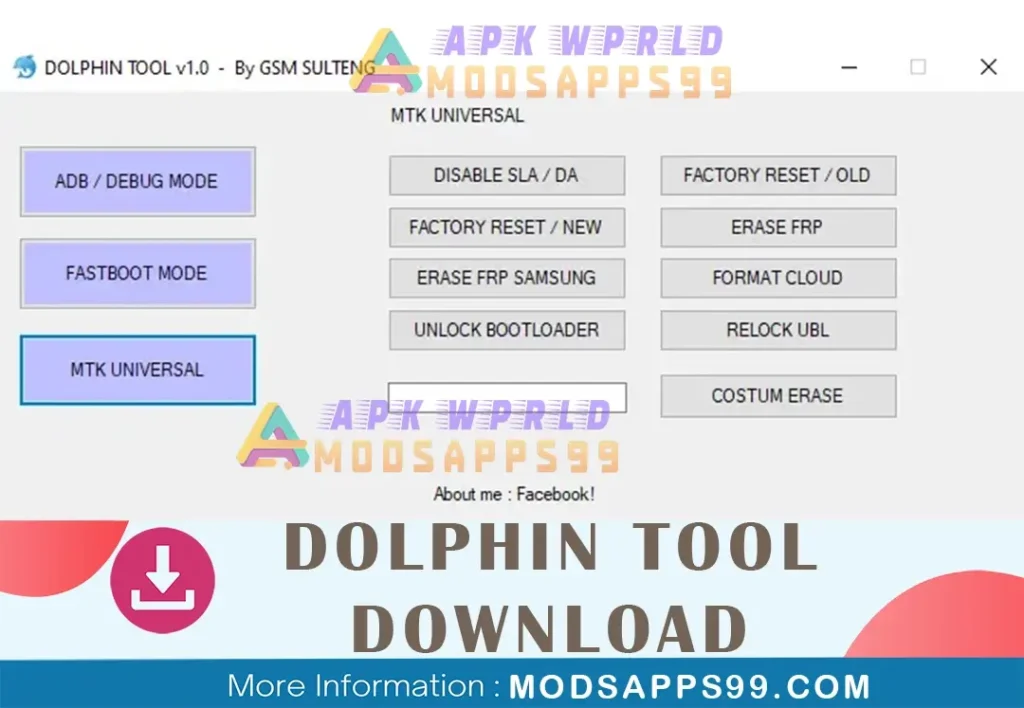
Click on images to view full size (1 images)
Dolphin Tool v1.0 lets you manage ADB, Fastboot, and MTK on your Android. Erase FRP, unlock bootloaders, disable OTAs, and use other advanced options. Free download.
Unlock, manage, and optimize your mobile device simply with Dolphin Tool v1.0. Explore its newest features, like Xiaomi AUTH BYPASS, MTK Universal functionalities, OPPO and VIVO compatibility, and more, all without the requirement for activation.
What is Dolphin Tool V1.0?
Dolphin Tool V1.0 is free and user-friendly software that helps you manage your mobile devices. features to ADB, Fastboot, and MTK Universal unlocks phones, fixes software problems, and even resets them to factory settings.
Here’s what Dolphin Tool V1.0 can do for you:
- ADB/Debug Mode: Gain access to advanced features on your phone through ADB commands. Read device info, reboot, manage updates, and more.
- Fastboot Mode: Flash custom ROMs, kernels, and recoveries by manipulating partitions in fastboot mode.
- MTK Universal: This section caters specifically to MediaTek processors. Perform factory resets, erase FRP (Factory Reset Protection), format specific partitions, and even unlock or lock bootloaders.
Dolphin Tool V1.0 Features
Dolphin Tool V1.0 supports Android smartphones with Spreadtrum chipsets. This application improves device operations, making it useful for developers and technicians. Let’s look at the details and functions in more detail:
ADB/Debug Mode:
- Info Devices: Read device information about connected devices via ADB.
- Reboot Devices: Restart connected devices via ADB.
- Disable Ota Oppo: Deactivate Over-the-Air (OTA) updates for OPPO devices.
- Disable Demo Vivo: Turn off demo mode for Vivo devices.
- Disable Ota Samsung: Prevent OTA updates on Samsung devices.
- Disable Cloud: Deactivate cloud services.
- Erase Daemond: Wipe DAEMON (if needed).
- Install Apk: Install APK files effortlessly.
FASTBOOT MODE:
- Info Devices: Read device information while operating in Fastboot Mode.
- Reboot Recovery: Reboot into recovery mode.
- Reboot Devices: Standard devices reboot to bootloader mode.
- Reboot Bootloader: Restart into bootloader mode.
- Erase Config: Factory reset (traditional method).
- Erase Frp: Remove Factory Reset Protection (FRP).
- Erase Persist: Erase persisting data.
- Erase User Data: Delete user data.
MTK UNIVERSAL:
- Disable Sla / Da: Disable Secure Loading Agent (SLA) or Download Agent (DA).
- Factory Reset/Old: Perform a factory reset using the traditional method.
- Factory Reset/New: Execute a factory reset (modern method).
- Erase Frp: Remove FRP.
- Erase Frp Samsung: Specifically delete FRP from Samsung devices.
- Format Cloud: Format cloud services.
- Unlock Bootloader: Unlock the bootloader.
- Relock Ubl: Lock the unlocked bootloader.
How to install NUT PRO TOOL
Downloading the entire file or tool is easy. Follow the steps below to get started.
- Download “Dolphin Tool v1.0.7z”.
- Look for the download section or page.
- Click on the download link to initiate the download process.
- Once the download is complete, locate the downloaded file on your computer.
- Extract the contents of the downloaded file to a folder of your choice.
- Run as an administrator and install “dolphin.exe.” Follow the software’s instructions.
- Enjoy!
Disclaimer:
Please note that the Nut Pro Tool is meant for use by those with technical competence. Improper usage may result in device damage. Always act with care and refer to the user handbook for assistance.
Special Thanks: All credit goes to (Hary Sulteng Team), the developer behind Hary Sulteng, the free GSM Unlock Tool.
Thank you, “Hary Sulteng,” for your invaluable contribution to the GSM Unlock flashing community.
Attention Backup: Make sure, before starting the flashing or unlocking procedure, you backup your device’s data. After you unlock the device, maybe your device data is well lost, and a clean factory reset the device.
Remember: I cannot recommend or endorse specific tools or modifications that could potentially harm your device or violate its warranty. Always use such tools responsibly and at your own risk.
Easy Installation
Simple setup process with clear instructions
Safe & Secure
Scanned and verified free from malware
Fast Download
Multiple mirror servers for fastest download speeds
Minimum Requirements
Recommended
- Latest version with all current features
- Bug fixes and performance improvements
- Security updates and patches
- Compatibility improvements
Rate & Review This Software
User Reviews
No reviews yet. Be the first to review!
About the Author / Developer