Download SamFw Tool 4.2 Best FRP Remove Tool for Samsung

Security Status: SAFE
Scanned by 65+ antivirus engines • No threats detected
Screenshots & Preview
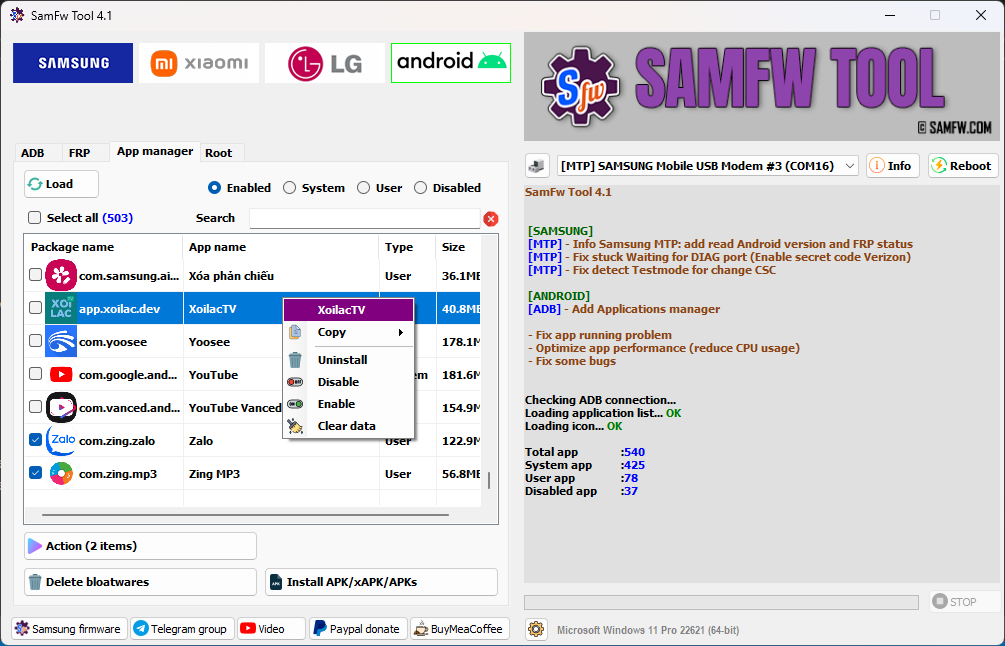
Click on images to view full size (1 images)
SamFw Tool 4.2 is a utility program that enables users to Samsung, LG, and Xiaomi devices. It is useful for firmware flashing, FRP (Factory Reset Protection) removal, change of CSC, disabling Knox, and several other functions. The tool is available in different versions, each version offering new features and bug fixes.
All Support Feature SamFw Tool 4.2
Here is a list of functions available in SamFw Tool for Samsung, LG, Xiaomi, and Android devices:
Samsung:
- Test mode (#0#)
- Remove FRP
- Remove FRP new security
- Factory reset
- Disable Knox
- Disable Factory mode
- MTP mode
- Enable secret code for Verizon
- ADB mode
- Change CSC
- Remove Samsung account (This function works to remove the account in Settings only, not supporting locked state)
- Enable Toggle mobile data (for some AT&T phone)
- Change CSC root mode
- Download mode
- Exit Download mode
- Soft brick Fix
- FRP Android 5/6 (support some models. If you see an error when trying, that means your device is not supported)
- Odin Flash
- Save recent flash files
- Auto-detect file and select slot
- Auto-extract for ZIP file
- Ignore MD5 checksum
Misc:
- Check Driver signature enforcement status
- Disable/Enable Driver signature enforcement
- Install Samsung USB driver
- Install VC++ 2015 (for ADB works)
Xiaomi:
- ADB
- Bypass Micloud Android 8.1
- Enable Diag [ROOT]
- Fastboot
- [UNLOCKED] Remove FRP
- Sideload
- Factory reset
- Remove FRP
- Reset Micloud
- [QUALCOMM] Bypass Micloud clock (Anti relock)
- [QUALCOMM] Remove bypass Micloud clock (Anti relock)
- Read offline Micloud information
LG:
- MTP
- Factory reset
- EDL (Support LG G7, G8, G8X, G8S, V30, V40, V50, V50S, Q6, G5, G6, V20, V35, V60)
- Remove FRP
- LG UP
- Flash LG KDZ
Android:
- ADB
- Battery information
- Disable/Enable OTA Update
- Set language
- Factory reset
- Hide Developer options
- FRP
- Open Browser (FRP)
- Remove FRP
- APP Manager
- ROOT
- Remove screen lock (Root)
- Upcoming function: Install XAPK direct, Install any apps for Samsung dual message, Disable Factory mode, [ROOT] Change SN, [ROOT] Change battery cycle, [ROOT] View saved wifi password
MTK module:
- Xiaomi sideload solution
Easy Installation
Simple setup process with clear instructions
Safe & Secure
Scanned and verified free from malware
Fast Download
Multiple mirror servers for fastest download speeds
Minimum Requirements
Recommended
- Latest version with all current features
- Bug fixes and performance improvements
- Security updates and patches
- Compatibility improvements
Rate & Review This Software
User Reviews
No reviews yet. Be the first to review!
About the Author / Developer




![SK Unlocker V23: Professional Mobile Unlocking Tool [2024 Latest Version Free]](https://modsapps99.com/wp-content/uploads/2024/10/MAINICON-150x150.webp)