free Download MCT DaukHywee TOOL V1.0.08 Full Version use Without Dongle
FREE
0 downloads
Windows

Published byPir Muhammad akash
Verified Publisher
Security Status: SAFE
Scanned by 65+ antivirus engines • No threats detected
Screenshots & Preview
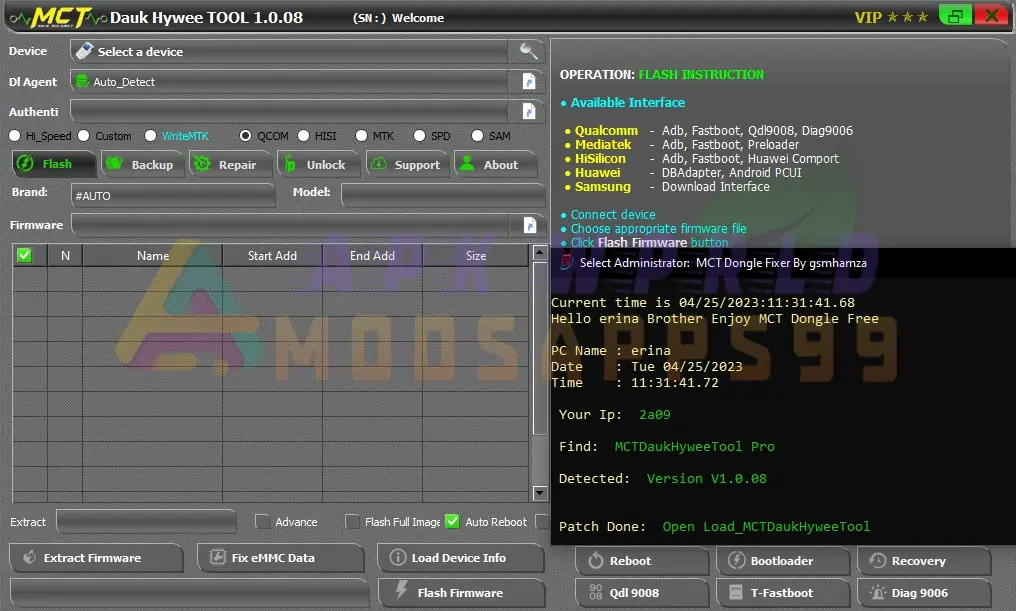
Click on images to view full size (1 images)
Get the MCT DaukHywee TOOL V1.0.08 Full Version for free and unlock your device without a dongle. Backup all modes: Auto-Detect MTK, Qualcomm, HiSilicon platforms including Qualcomm (ADB, QDL9008, Diag9006), MediaTek (ADB, Preloader), and Hi-Silicon (ADB, Fastboot). Enjoy multiple backup methods: EMMC RAW, SP FLASH TOOL, BOARD FIRMWARE, ORDINARY Backup, FASTBOOT Firmware.
Feature Of MCT DaukHywee TOOL V1.0.08
- PCUI Interface Flashing (Qualcomm)
- DB Adapter Flashing (Hi-Silicon)
- MT6572 Read/Write support
- MT6589 Read/Write support.
- MT6752 Read/Write support.
- Added support for many Qualcomm devices.
Bug Fixes Of MCT DaukHywee TOOL:
- Fixed bricked state when using Qdl9008 Flashing
- Fixed unstable state on Mtk preloader
- Fixed direct flashing for Update.app with new emmc (Qcom only)
- Fixed 99% stuck for Backing up Qcom/Mtk
- Fixed “Unsupported Interface” bug
- Fixed the requirement of “Preloader” file on Mtk Read/Write
- Fixed “Invalid Firmware” issue for Qualcomm
- And many other minor bugs fixed.
- Timezone errors
- MTK/Qualcomm connection bugs
- Improved speeds for MTK/Qualcomm/Hi-Silicon
- Faster restore times for MTK/Qualcomm/Hi-Silicon
- Activation issues fixed on version 1.0.02
- Improved backup/restore speed and connection
- Increased compatibility and reliability.
- Improved backup and flashing connections for Qualcomm and Mtk devices
- Fixed minor bugs
- Added support for new devices.
Flashing (All Modes: Auto-Detect MTK, Qualcomm, HI-Silicon Platform)
- Qualcomm: ADB, Fastboot, QDL9008, Diag9006
- MediaTek: ADB, Fastboot, Preloader
- HiSilicon: ADB, Fastboot, Huawei Comport
- Huawei: DB Adapter, Android PCU
- UFS Type Auto Detect for Flashing!
- Huawei UPDATE.APP Direct Flashing Via Preloader Mode, 9008 Mode (No Need Board Firmware), Huawei USB 1.0 Test Point Mode (No Need Board Firmware, World 1st)
- HiSilicon Flashing Direct without Bootloader Unlock! (Fastboot)
- Many Ways Of Firmware Extracting Method! (Huawei UPDATE.APP (or) EMMC RAW Backup to SP FLASHTOOL Extract (MTK), Qualcomm board Firmware, Hisilicon Board Firmware & many extracting methods!)
- Fix EMMC Data (Fix Invalid EMMC Data Backup!, World 1st)
- Preloader Analyzer (View Compatible EMMC CID for EMMC Replacing)
- MTK Download Agent Analyzer (View valid EMMC CPU Numbers which can use with DA)
- Flash Huawei devices through Hi-Silicon Com port (Huawei Com1) using Update.app files.
- Flash Samsung devices with a single file
- SDM Platform Flashing
- EMMC Test
- Partition Function available in Adv Options
- Ability to flash Xml, Update.app, and Raw Firmware files to EMMC Stick IC
Backup (All Modes: Auto-Detect MTK, Qualcomm, HiSilicon Platform)
- Qualcomm: ADB, QDL9008, Diag9006
- MediaTek: ADB, Preloader
- Hi-Silicon ADB, Fastboot
- Multiple Backup Methods (EMMC RAW, SP FLASH TOOL, BOARD FIRMWARE, ORDINARY Backup, FASTBOOT Firmware)
- UFS Type Auto Detect for Full Partition Backup!
- Hi-Silicon Backup (World 1st)
- SDM Platform backup
- EMMC Backup
Repair (MTK, Qualcomm, HI Silicon Platform)
- Xiaomi DM-Verify
- Xiaomi Wifi/Sensor Fix
- Bootloader Unlock Read, Direct Unlock (HI-silicon)
- Bootloader Read, Unlock (Qualcomm, 9008 Mode)
- Repair IMEI, MEID, SN, Wifi Mac, Vendor, Country
- Fix Unknown Baseband!
- Support Flashing with Emate Pro, EMMC USB Stick!
- Support Backup with Emate Pro, EMMC USB Stick!
- Root Function included!
- Unlock Huawei Bootloader via EDL mode.
- Improved method for Xiaomi Unlock/Bypass
- Fixed Samsung Download Mode instability
- Install Zawgyi/Unicode without rooting via EDL mode
- Fixed issue with Vivo device hanging on logo after operation
- Unlock FRP (Factory Reset Protection) on some Samsung devices.
- Remove user lock (PIN, pattern, password) without losing userdata
- Unlock FRP on Qualcomm and Mtk devices via Com port
- Test eMMC pattern on Qualcomm and Mtk devices
- Directly unlock Xiaomi bootloader
- Fix Huawei devices in Step 2 with issues such as notifications, themes, IMEI, and network after Board Software flashing
- Unlock Mi Account (Mtk and Qualcomm) for devices such as Note 4, Note 4x, Note Pro, Mi 5, etc.
EMMC Test Feature
- Qualcomm: ADB, QDL9008, Diag9006
- MediaTek: ADB, Preloader
- HiSilicon: ADB, Fastboot
- EMMC Testing (HiSilicon, Qualcomm, MTK)
- Empty EMMC Test!
- Wipe EMMC, Wipe EMMC Except Partition Table
- Full Factory Default
- Wipe Userdata, Format Userdata
- Wipe Cache, Format Cache
- Wipe NV Data
- Fix Extension Userdata
Unlock Tab Feature
- Qualcomm: ADB, QDL9008, Diag9006
- MediaTek: ADB, Preloader
- HiSilicon: ADB, Fastboot
- Read Pattern
- Reset All User Security!
- Reset Anti-Theft Lock!
- Reset Privacy
- Read Pin (Bruteforce)
- Read Password (Bruteforce)
- Remove All userlock (No data loss)
- Reset All Security
- Vivo Bootloader Unlock (Data will be lost)
- One Plus Bootloader Unlock
- Xiaomi Bootloader Unlock
- Meizu Bootloader Unlock
- FRP
- EMMC Read Pattern
- EMMC Read Pin
- EMMC Read Password
Account Unlock Feature
- Remove Mi Account
- Remove Huawei FRP!
- Remove Huawei ID
- Remove FRP (Qualcomm, MTK)
- Two methods to unlock Qualcomm Mi Account
- Can create a new account and effectively fix sensor errors
MediaTek Tab Feature
- Read/Write Huawei Y6 Pro Row (TIT-AL00)
- Read/Write Kenbo Sun 1 E111
- Read/Write Kenbo Fly 2 (O51)
- Read/Write Meizu M5 (611H)
- Read/Write Meizu M5 Note (621H)
- Read/Write Oppo F5 Youth (CPH1726)
- Read/Write Vivo V5 Lite (Y66)
- Added support for more SoCs: MT6582, MT6572, MT6580
- Read/Write/Reset FRP for Oppo A71 (CPH1717)
- Read/Write/Reset FRP for Lenovo A6600+ (A6600A40)
- Read/Write for Redmi Note 3 (Hennessy)
Qualcomm Tab Feature
- Added more DA files for new Qualcomm devices
- Added support for more SOCs such as ZTE, Lenovo, Vivo, and Mi
General Tab Feature
- Read pattern/remove userdata area for MTK (preloader mode), Qualcomm (9008 mode), Hi-Silicon (ADB mode)
- Reset FRP for MTK (preloader mode) and Hi-Silicon (Fastboot mode)
Hi-Silicon Flashing:
- Direct Update.app flashing on Hi-Silicon without bootloader unlock (online connection required while flashing)
SUPPORT Tab Feature
- Added Test Point
- QCN
- Dl Agent
- Firmware
NETWORK Tab Feature
- Imei Repair
- QCN Backup/Restore
- Baseband Unknown Fix
MISC Tab Feature
- Firmware Extraction
- Boot Unpack/Repack
- Sparse Convert
FORENSIC Tab Feature
- File Explorer
- Contacts Recovery
- Call Log Recovery
- SMS Recovery
To install the MCT DaukHywee Tool V1.0.08, follow these steps:
- Use the MCT DaukHywee TOOL V1.0.08.7z File to access the tool.
- Using a file extractor program like WinRAR or 7-Zip, extract the downloaded MCT DaukHywee TOOL file.
- Launch the setup program in administrative mode.
- Installing the tool on your PC involves following the on-screen directions.
- Launch the tool and begin using it when the installation is finished.
Easy Installation
Simple setup process with clear instructions
Safe & Secure
Scanned and verified free from malware
Fast Download
Multiple mirror servers for fastest download speeds
Minimum Requirements
Operating SystemWindows 7 / Android 5.0
Processor1 GHz
RAM512 MB
Storage100 MB free space
Recommended
Operating SystemWindows 10/11 / Android 10+
Processor2 GHz Dual Core
RAM2 GB
Storage500 MB free space
v1.0April 25, 2023Latest
- Latest version with all current features
- Bug fixes and performance improvements
- Security updates and patches
- Compatibility improvements
5.0
2 reviews
Rate & Review This Software
User Reviews
No reviews yet. Be the first to review!
About the Author / Developer