Download Ramdisk tool V6.2.1 08-03-2023

Security Status: SAFE
Scanned by 65+ antivirus engines • No threats detected
Screenshots & Preview
Click on images to view full size (1 images)
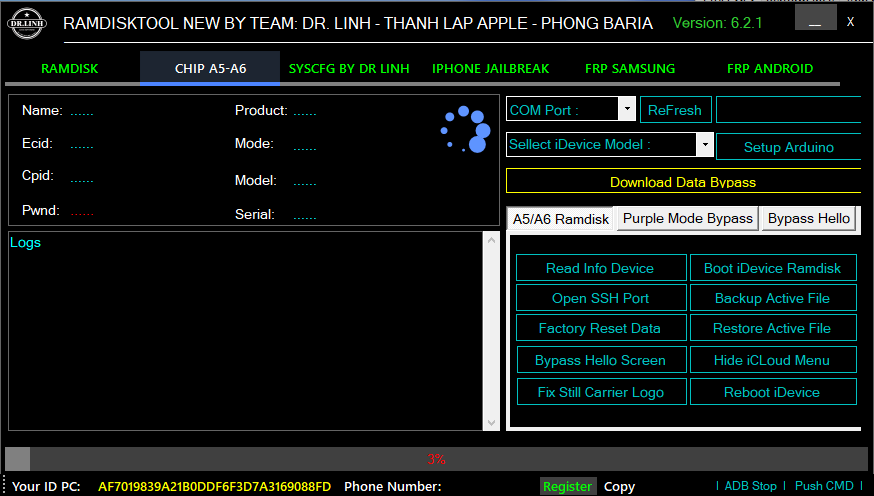
The iPhone and Android Team DR.LINH, Thanh Apple, and Phong Baria have developed a powerful tool called the Ramdisk tool V6.2.1 08-03-2023 [Multi-Tool] the “Fix Tab iPhone Jailbroken” feature can be used to fix any issues related to a jailbroken iPhone. The tool also allows users to fix devices that are stuck in DFU mode, and the “Fix Auto Setup Driver” function automatically sets up drivers for the device. Additionally, users can check the iOS version of their device in Recovery mode using the Ramdisk tool. The Ramdisk tool V6.2.1 is a comprehensive and reliable tool that can help users fix a variety of issues with their iOS and Android devices.
Full Support Feature Ramdisk tool V6.2.1 08-03-2023
Here are the features of iPhone and iPad, as well as the functions of MediaTek and Qualcomm:
Features of iPhone and iPad:
A5-A6 Chip Type:
- Run iPwndfu Mode: Enables users to enter iPwndfu mode.
- Boot iDevice Ramdisk: Allows users to boot their device into a RAM disk.
- Connect SSH iDevice: Enables users to connect to their device via SSH.
- Backup Active iDevice: Allows users to backup their active device.
- Factory Reset Data: Performs a factory reset on the device.
- Restore Active iDevice: Allows users to restore their active device.
- Fix iServer (*.sisv): Fixes iServer issues.
- Read ID & Number: Reads the device ID and number.
- Read info HDD iDevice: Reads information about the device’s hard disk drive.
- Change Serial Number: Allows users to change the device’s serial number.
- Create Active File: Creates an active file.
- Bypass Hello iOS 15 – 16: Bypasses the hello screen on iOS 15 and 16.
- Fix Still Carrier Logo: Fixes the carrier logo.
- Restore Baseband: Restores the device’s baseband.
- Block Update iOS 15: Blocks the device from updating to iOS 15.
- Read Info Device: Reads information about the device.
- Open SSH Port: Opens an SSH port on the device.
- Factory Reset Data: Performs a factory reset on the device.
- Bypass Hello Screen: Bypasses the hello screen.
- Fix Still Carrier Logo: Fixes the carrier logo.
- Boot iDevice Ramdisk: Boots the device into a RAM disk.
- Backup and Restore Active File: Allows users to backup and restore their active files.
- Hide iCloud Menu: Hides the iCloud menu.
- Reboot iDevice: Reboots the device.
- Purple Mode Bypass: Starts purple mode bypass.
- Start Purple Mode: Starts the purple mode.
- Open SYSCFG Software: Opens SYSCFG software.
- Edit Serial Number Tool: Allows users to edit the serial number.
- A5 Arduino Port: Compatible with iPad mini, iPad 2, iPad 3, iPhone 4s, and iPod 5.
A6 Chip Type:
- Read Info Device: Reads information about the device.
- Open SSH Port: Opens an SSH port on the device.
- Factory Reset Data: Performs a factory reset on the device.
- Bypass Hello Screen: Bypasses the hello screen.
- Fix Still Carrier Logo: Fixes the carrier logo.
- Boot iDevice Ramdisk: Boots the device into a RAM disk.
- Backup and Restore Active File: Allows users to backup and restore their active files.
- Hide iCloud Menu: Hides the iCloud menu.
- Reboot iDevice: Reboots the device.
Functions of MediaTek and Qualcomm:
- FACTORY RESET:
- MediaTek: Supported (BROM)
- Qualcomm: Supported (EDL, Sideload, Fastboot)
- ERASE FRP:
- MediaTek: Supported (BROM)
- Qualcomm: Supported (EDL, Sideload, Fastboot)
- AUTH Bypass:
- MediaTek: Supported (BROM)
- Qualcomm: Not supported
- SAFE FORMAT:
- MediaTek: Supported (BROM)
- Qualcomm: Supported (EDL, Sideload)
- UNLOCK BOOTLOADER:
- MediaTek: Supported (BROM)
- Qualcomm: Supported (EDL)
- NV BACKUP:
- MediaTek: Supported (BROM)
- Qualcomm: Not supported
- NV RESTORE:
- MediaTek: Supported (BROM)
- Qualcomm: Not supported
- NV ERASE:
- MediaTek: Supported (BROM)
How Install Ramdisk tool V6.2.1 08-03-2023
To install the Ramdisk tool V6.2.1 as of March 8th, 2023, you can follow these steps:
- Download the installation file for Ramdisk tool V6.2.1 from a trusted source.
- Double-click the downloaded file to open the installation wizard.
- Follow the prompts in the installation wizard to complete the installation process. This may include agreeing to the terms and conditions, selecting the installation location, and creating desktop shortcuts.
- Once the installation is complete, launch the Ramdisk tool by clicking on the desktop shortcut or by searching for it in the Start menu.
- To use the tool, refer to its documentation or help files for instructions on its various features and functions.
Easy Installation
Simple setup process with clear instructions
Safe & Secure
Scanned and verified free from malware
Fast Download
Multiple mirror servers for fastest download speeds
Minimum Requirements
Recommended
- Latest version with all current features
- Bug fixes and performance improvements
- Security updates and patches
- Compatibility improvements
Rate & Review This Software
User Reviews
No reviews yet. Be the first to review!
About the Author / Developer





![Unlock iCloud with Full Signal & SIM Support HTH ND All in One Tool for iOS 12-18 Devices [Free Download 2024]](https://modsapps99.com/wp-content/uploads/2024/10/Unlock-iCloud-with-Full-Signal-SIM-Support-HTH-ND-All-in-One-Tool-for-iOS-12-18-Devices-Free-Download-2024-150x150.webp)